Google Drive Rolls Out AI Ransomware Detection and Recovery to Broader User Base
Google is expanding AI-powered ransomware detection and file recovery capabilities across Google Drive, with the company stating its new detection model catches 14 times more threats than its predecessor.
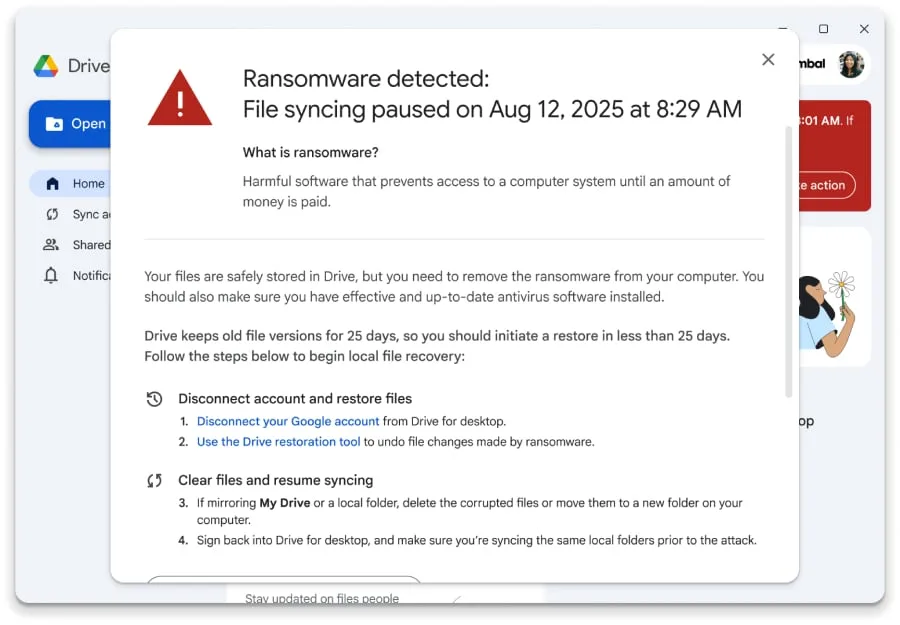
Google's latest update to Drive brings machine learning-based ransomware detection and integrated file recovery out of beta and into general availability. The company says its enhanced detection system identifies 14 times more threats compared to the previous version. This expansion represents a shift toward more proactive threat prevention, allowing Drive to intervene before attacks cause widespread damage.
Originally launched in beta during September 2025, this refined iteration emphasizes rapid detection and streamlined recovery workflows. The system now detects threats more quickly, and file restoration has evolved from a secondary concern into a structured, user-guided process. The update also provides greater transparency into the encryption activity occurring when files become compromised and access restrictions take effect.
Syncing stops when Drive spots trouble
Rather than simply alerting users to suspicious activity, Google Drive for desktop immediately halts file synchronization when ransomware is detected on a computer. This pause prevents compromised files from being uploaded to cloud storage, where they could cause additional harm.
Notifications flow to multiple stakeholders simultaneously. End users receive an alert on their device, while administrators get notified through email and the Admin console security center. This dual-notification system enables IT teams to identify and address threats right away, without waiting for support tickets to be filed and processed.
Upon detection, users gain access to a file restoration interface that lets them choose multiple previous, uninfected file versions and recover them all at once. Google describes this as substantially more efficient than traditional approaches such as device reimaging or third-party recovery software, particularly for organizations running standard Windows and Microsoft Office environments.
What's open to more users, and what stays tiered
File restoration functionality is accessible to all Google Workspace customers, Workspace Individual subscribers, and users with personal Google accounts, providing broad access to the recovery feature.
Ransomware detection availability is more restricted and limited to specific subscription levels:
- Business Standard and Plus
- Enterprise Starter, Standard, and Plus
- Education Standard and Plus
- Frontline Standard and Plus
For enterprise deployments, both capabilities are enabled by default and can be configured at the organizational-unit level through the Admin console. Detection settings for malware and ransomware are managed independently from file restoration controls.
Ransomware detection alerts on user computers require Drive for desktop version 114 or later, though the sync pause function operates on earlier versions as well. The rollout is currently live, with feature access determined by account classification, subscription level, and administrator configuration.
Read more

Identity governance faces new test as AI agents proliferate across enterprises
Autonomous AI agents are forcing organizations to rethink how they manage access and permissions at machine speed. SailPoint's Navigate conference will explore how identity security must evolve to handle this expanding population of non-human actors.

Vertical AI and Purpose-Built Hardware Drive Next Wave of Technology Growth
Specialized AI systems tailored to specific industries are emerging as the primary engine for the next phase of technology expansion, according to insights from the Bank of America Private Tech Trailblazers Conference 2026.

CrowdStrike and CoreWeave Partner to Automate AI Security at Machine Speed
As cyberattackers breach systems in seconds, CrowdStrike and CoreWeave are embedding automated defenses throughout AI infrastructure, turning attacks into training data for faster response.