Microsoft Expands Copilot With Code Generation, Automation Tools for Non-Technical Users
Microsoft has unveiled an overhauled version of Copilot for Microsoft 365 that introduces a Code interface for building simple applications without programming knowledge, alongside new automation and document editing capabilities.
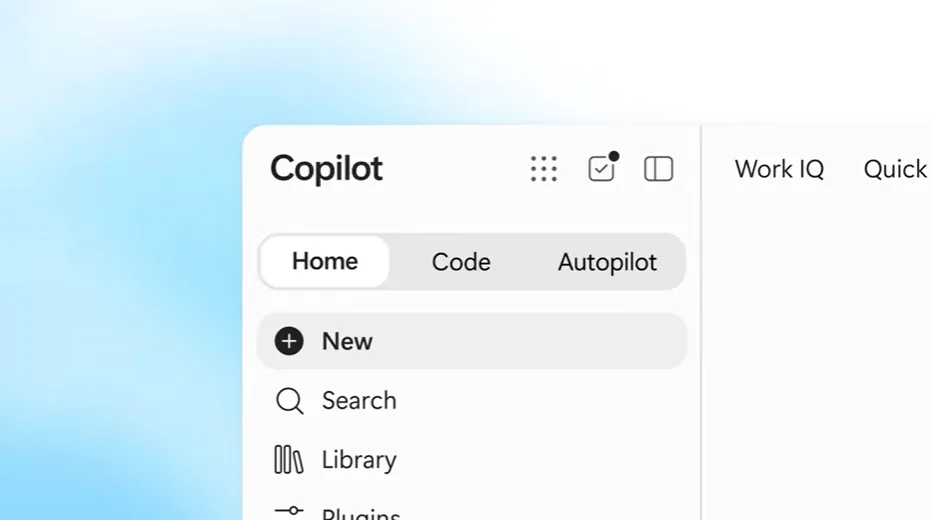
Microsoft Corp. has released an updated iteration of Copilot, its AI assistant embedded within the Microsoft 365 productivity ecosystem.
The most significant enhancement is a new interface component labeled Code, which allows business users without technical expertise to construct lightweight applications through natural language prompts. A business analyst, for instance, could generate a sales tracking dashboard using this feature. These Copilot-powered applications can exist as standalone desktop widgets or be deployed as cloud-based services.
When applications are hosted in the cloud, team members gain the ability to distribute them across their organization. Microsoft has introduced Copilot Managed Runtime to streamline this process, handling the deployment of AI-generated applications in cloud infrastructure without requiring users to perform manual setup or ongoing maintenance work.
The Copilot Managed Runtime offering includes an SDK and a command line tool that enable software engineers to enhance applications initially created by non-technical team members. A developer might, for example, establish a connection between an AI-generated application and a third-party system.
Teams can preview and improve a new version while the current version remains available to users. Identity and policy are enforced through the host. Monitoring, usage and inventory give your organization visibility into what's been built, how apps are being used and app health.
David Blyth, vice president and general manager of Microsoft's managed apps and agents group
The Code section is accessible through a redesigned homepage that also provides entry to a second interface mode called Chat, intended for general productivity tasks. This mode integrates with the Office suite of applications.
Through Chat, users can instruct Copilot to generate Word, Excel, or PowerPoint documents by specifying their desired contents. The interface also supports document modification workflows, displaying the document under revision directly within Copilot so users can make adjustments manually as needed.
A third new interface component, Autopilot, permits users to construct AI agents that operate without requiring code authorship. Microsoft indicates these agents can be programmed to handle routine task automation or execute actions triggered by particular business scenarios. They are capable of managing intricate, sequential processes that would normally demand extensive, detailed instructions.
Copilot tailors its responses by leveraging business data stored within an organization's systems. This capability relies on Microsoft IQ, a data integration service receiving enhancements in this update. The enhanced Microsoft IQ now accesses information from Dynamics 365, which maintains customer relationship data, and Power Platform, a collection of tools supporting use cases ranging from analytics to workflow automation.
Microsoft has outlined plans to introduce additional Copilot improvements in the coming period. An upcoming interface section called Today will surface users' highest-priority pending tasks and automatically complete certain ones. The company is also developing functionality that will eliminate the requirement for users to manually transition between Copilot's Chat and Code interfaces.
Read more

California Tightens Rules on Robotaxis as Incidents Mount
A new state law sets safety standards and accountability measures for autonomous vehicle operators, requiring local support staff and penalties for blocking emergency responders.

Wawa Elevates Long-Tenured Executive to CIO Role
The convenience store chain has named Bill O'Donnell, a 25-year company veteran, as its new chief information technology officer, putting him in charge of tech strategy, cybersecurity and digital operations.

ServiceNow Debuts Flow, a Conversational Service Desk Built for Speed Over Complexity
ServiceNow is rolling out Flow, a natural language service desk tool that automates employee requests through Slack and Microsoft Teams without requiring a full IT service management overhaul.