iOS 27 Redesigns iPhone's Core Interface for Apple's First Foldable
Apple's iPhone Duo demands a fundamentally different approach to iOS, moving controls to the sides, splitting the Home Screen across two displays, and enabling multitasking that conventional iPhones have never supported.
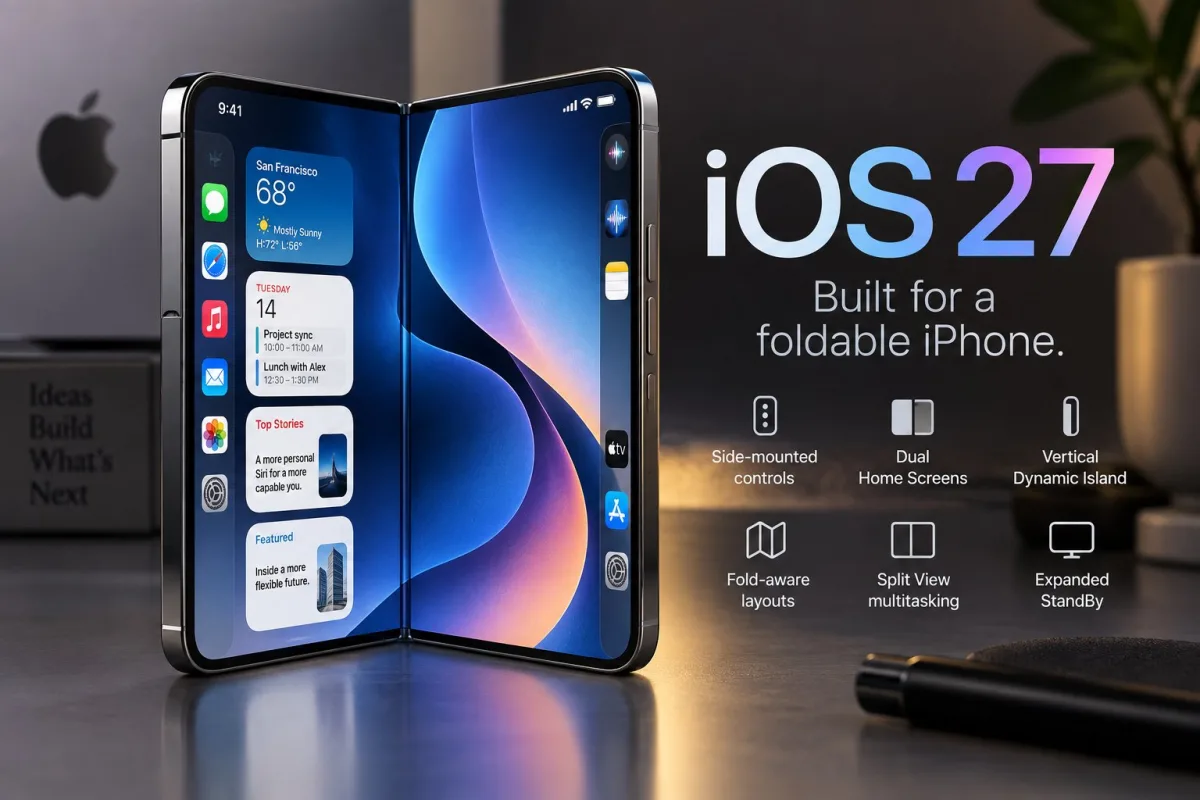
The arrival of iPhone Duo forces iOS to operate in ways the operating system has never attempted. Rather than simply expanding the interface across a 7.6-inch foldable screen, iOS 27 restructures where buttons and navigation live, how applications scale themselves, the mechanics of running multiple tasks, and the behavior of the device when partially open or resting flat on a surface.
This represents a departure from how iOS functions on traditional iPhones. The software must contend with dual screens, shifting display dimensions, the physical hinge, and concurrent app windows while maintaining usable controls as the device opens, closes, rotates, and settles at various angles.
- Lock Screen controls, the Dock, and navigation shift to the sides
- Two Home Screen pages display simultaneously when Duo unfolds
- Alerts and Live Activities align along the side of either display
- Applications adjust to screen shape, orientation, hinge position, and fold angle
- Two applications, or two instances of a single app, operate side by side
- StandBy functions on either display without requiring a power connection
1. Controls move to the sides
Apple has repositioned Lock Screen controls, the Home Screen Dock, and app navigation to the lateral edges rather than anchoring them at the bottom of the display.
According to Apple's iPhone Duo announcement, this repositioning preserves vertical screen real estate. It additionally positions frequently accessed controls nearer to the outer edges when the device is open.
For developers, the implications extend beyond cosmetic changes. Standard navigation elements adjust on their own, though custom interfaces must account for Duo's uneven safe areas to prevent buttons from overlapping with system controls, cameras, or other protected zones.
2. Two Home Screens appear when Duo opens
Unfolding iPhone Duo displays two Home Screen pages simultaneously rather than magnifying a single page across the expanded canvas.
The left side of the inner display shows Today View as a vertically scrollable widget collection, delivering a more tablet-oriented information experience without converting iOS into iPadOS.
This distinction matters significantly. Apple preserves the fundamental iPhone interaction paradigm while leveraging the extra width to present additional content at once, rather than replacing the recognizable Home Screen with an entirely new interface.
3. Dynamic Island turns vertical
Dynamic Island undergoes redesign to accommodate the foldable form factor.
On Duo, the element runs vertically along the edge of both the outer and inner displays and expands to surface Live Activities and alerts. The status bar adopts a new flexible circular format that fits into a corner, consolidating Wi-Fi, cellular, battery, and other information.
These adjustments clear the center of the wider inner display for actual content rather than spreading traditional iPhone interface elements across it.
4. Apps react to the hinge and fold angle
This is where Duo's software transcends being merely a larger iPhone interface.
Content can shift position as the phone folds, realign when the device rotates, and transfer to the correct screen when Duo flips. Interactive components can also relocate away from the display crease when the phone is partially folded.
Apple has already released developer guidance for iPhone Duo addressing adaptive layouts, resizability, safe areas, fold-aware regions, and testing across different poses.
The fold itself can serve as a dividing line that applications leverage when organizing content. Apple suggests allowing system containers to adjust automatically wherever feasible rather than constructing a wholly separate interface for each angle.
This strategy reduces some of the developer complexity that first-generation hardware might otherwise impose. Unmodified apps can operate on Duo without redesign, but applications built around flexible layouts and current SDKs can leverage the inner display more efficiently.
5. Split View brings two-app multitasking to iPhone
Duo marks the first iPhone capable of displaying two applications side by side using Split View.
Users can exchange either app, store app combinations for future use, launch two windows of the same application like Safari, or maintain Siri AI visible alongside a different app. Apple indicates all apps participate in multitasking on Duo, while apps already engineered to resize should transition more cleanly.
This capability strengthens Duo's productivity positioning relative to standard iPhones and brings it into alignment with workflows customers may already know from an iPad mini.
Apple maintains a more conservative stance compared to Samsung. TechRepublic's analysis of the Galaxy Z Fold8 determined that Samsung's established Multi Window, Taskbar, and DeX setup remains the more comprehensive multitasking platform.
6. StandBy no longer requires charging
StandBy undergoes more substantial modifications on Duo than on Apple's conventional iPhones.
Placing the device down can activate StandBy on either the inner or outer display even when the phone lacks a power connection. Duo can then operate as a timepiece, photo viewer, or widget display.
Apple has introduced Calendar and Weather faces alongside Clock and Modular, while the Photos face can present Shared Albums. Faces also offer expanded color options, typeface choices, and complications.
The foldable design makes this capability more practical because Duo can prop itself at different angles rather than depending on an external stand.
Third-party apps are the next test
These six changes assign iOS 27 a responsibility Apple has never demanded before: sustain the recognizable iPhone experience while constantly responding to a device whose functional shape transforms as users handle it.
Apple has invested more in developer support than its launch announcement initially conveyed, with Duo-specific design guidance, APIs, simulator support, and Xcode tools available or rolling out around launch. The actual challenge will emerge when third-party apps navigate that transition after customers receive the hardware.
iPhone Duo carries a starting price of $1,999. Preorders commence October 16, with availability beginning October 23, and Apple confirms the phone will arrive with iOS 27.1.
Apple Pencil support will arrive on iPhone Duo later in 2026, though it will not be present at launch.
Read more

California Tightens Rules on Robotaxis as Incidents Mount
A new state law sets safety standards and accountability measures for autonomous vehicle operators, requiring local support staff and penalties for blocking emergency responders.

Wawa Elevates Long-Tenured Executive to CIO Role
The convenience store chain has named Bill O'Donnell, a 25-year company veteran, as its new chief information technology officer, putting him in charge of tech strategy, cybersecurity and digital operations.

ServiceNow Debuts Flow, a Conversational Service Desk Built for Speed Over Complexity
ServiceNow is rolling out Flow, a natural language service desk tool that automates employee requests through Slack and Microsoft Teams without requiring a full IT service management overhaul.