Eight Project Management Platforms Tailored for Freelancers
Freelancers juggling multiple clients and deadlines need reliable tools to stay organized. We reviewed eight leading project management platforms to help independent workers find the right fit for their business needs.

- Best for freelance business: Asana
- Best for affordability: nTask
- Best for complex projects: ClickUp
- Best for creative teams: Notion
- Best for time tracking: Wrike
- Best for Agile teams and developers: Jira
- Best kanban board views: Trello
- Best for team communication: Basecamp
Managing multiple client projects simultaneously can quickly become chaotic without proper systems in place. Missed deadlines and lost information plague many independent contractors who lack organizational infrastructure. Project management software addresses these challenges by providing centralized platforms where freelancers can monitor timelines, coordinate with clients, and track deliverables. The market offers hundreds of options, making it difficult to identify which platform best serves your specific workflow and budget constraints.
This guide examines eight leading project management solutions designed with freelancers in mind. Each platform brings distinct strengths—from affordability and time tracking to advanced features for complex initiatives. We analyzed pricing structures, available features, integration capabilities, and user experience to help you make an informed decision.
Asana: Best for freelance business
Asana stands out as a cloud-based solution that streamlines freelancer management through automated reminders. The platform sends daily task notifications containing due dates directly to team members, helping ensure timely completion. Its Agile capabilities enable teams to monitor progress, manage individual assignments, and organize sprint cycles. To-do list functionality helps users prioritize work effectively. Beyond general project management, Asana offers specialized modules for event planning, human resources, engineering, IT operations, and design disciplines.
Pricing
- Personal: Free for up to 15 team users
- Starter: $10.99 per user per month (annual billing) or $13.49 per user per month (monthly billing)
- Advanced: $24.99 per user per month (annual billing) or $30.49 per user per month (monthly billing)
- Enterprise: Custom pricing available through sales team
- Enterprise+: Custom pricing available through sales team
Standout features
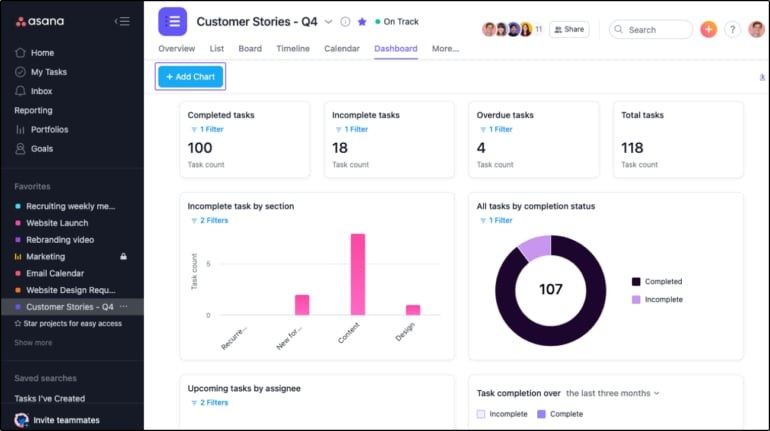
- Integrations with over 200 tools including Slack, Salesforce, Figma and Microsoft Teams
- Gantt chart and Kanban board visualization options
- Team management capabilities for adding, removing and managing members
- Ability to collaborate with external vendors, contractors and partners directly on the platform
- Portfolio management functionality
- Content calendar planning and management tools
Top Asana integrations
- Communication: Microsoft Teams, Vimeo, Rewatch, Neuralmind and Happeo
- IT and development: ServiceNow, Looker, Okta, RoleUp, GitLab and GitHub
- Sales and services: Salesforce, Freshdesk, Zoho Desk, and HubSpot
- Files: Box, Google Drive, OneDrive and Dropbox
Pros and Cons
- Workflow automation is advanced and easy to use
- Single assignee is the only option for tasks
- Time tracking is only available for Asana Business and Enterprise customers
Asana encourages collaboration by enabling freelancers to communicate with clients and colleagues within the platform. Features like comments, file sharing, and live updates keep all stakeholders aligned and facilitate seamless teamwork.
nTask: Best for affordability
Founded in 2015, nTask has rapidly gained traction in the project management sector by combining user-friendly design with budget-friendly pricing. The platform serves small businesses, teams, students, nonprofits, and independent contractors. It enables resource allocation, milestone monitoring, and budget tracking. The dashboard provides four distinct views—list, grid, calendar, and kanban boards—allowing teams to customize their workspace. nTask also supports distributed teams by facilitating document collaboration and file storage.
Pricing
- Basic: Free for teams up to five members
- Premium: $3 per user per month (annual billing) or $4 per user per month (monthly billing)
- Business: $8 per user per month (annual billing) or $12 per user per month (monthly billing)
- Enterprise: Custom pricing through sales team
Standout features
- Time tracking and employee timesheet management
- Bug and issue tracking with severity and priority classification
- Meeting planning with agenda setting and integration with Microsoft Teams and Zoom for link generation
- Gantt chart and kanban board support
- Third-party integrations including Salesforce, Slack, HubSpot, and Google Calendar
- Available in seven languages: English, Arabic, German, Spanish, Portuguese, Chinese and French
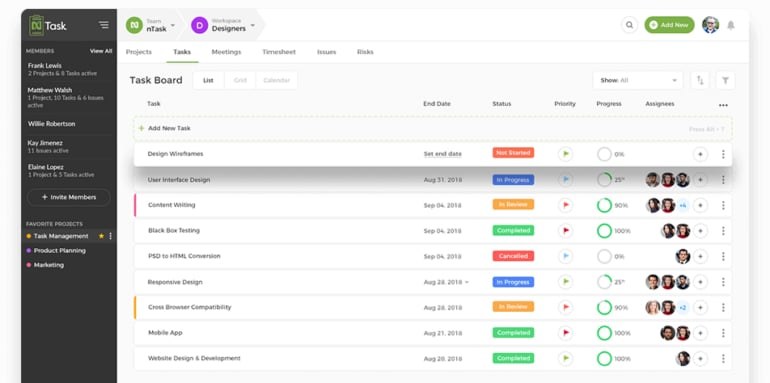
Top nTask integrations
- Video conferencing: Google Meet, Microsoft Teams and Zoom
- Calendar: Apple, Outlook and Google calendars
Pros and Cons
- Managers can create to-do lists and assign them to team members
- Its free plan lacks project management capabilities
Cost considerations often constrain freelancers' tool selection, as many project management platforms carry substantial price tags. nTask addresses this concern by offering both a limited free version and reasonably priced paid tiers with full feature access. This approach makes it an attractive option for independent workers seeking cost-effective project management solutions.
ClickUp: Best for complex projects
ClickUp delivers versatility through its free plan, which includes essential features for managing freelance operations. Real-time reporting, customizable views, task management, and round-the-clock support enable individuals and contractors to handle intricate projects. Engineering teams benefit from integrations with GitHub, GitLab, Bitbucket, Sentry, Slack, and Figma for development-focused work. Marketing agencies can leverage the platform for campaign and content calendar management, while IT departments can use it for request tracking, triage, and assignment.
Pricing
- Free Forever: No cost for 100MB of storage and unlimited tasks
- Unlimited: $7 per member per month (annual billing) or $10 per member per month (monthly billing)
- Business: $12 per member per month (annual billing) or $19 per member per month (monthly billing)
- Enterprise: Custom pricing through sales team
Standout features
- 15+ highly customizable views
- Real-time reporting capabilities
- Natural language processing functionality
- 50+ native integrations including Slack, Google, GitLab, HubSpot, Loom, Zoom and more
- Task management and planning tools
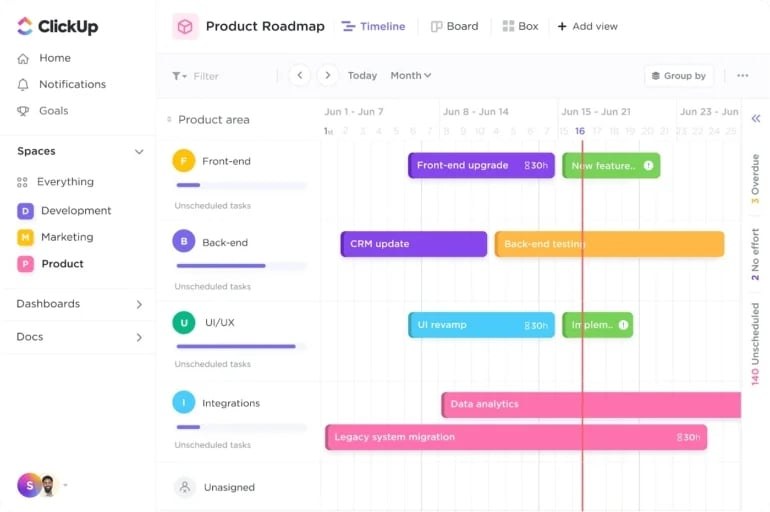
Top ClickUp integrations
- Communication and collaboration tools: Slack, Microsoft Teams and Zoom
- Time tracking tools: Time Doctor, Harvest and Clockify, allowing freelancers to log billable hours directly within ClickUp
- File storage and sharing: Google Drive and Dropbox integration for seamless file attachment to tasks and projects
Pros and Cons
- The free plan includes all necessary features needed to manage freelancers or individual projects
- Suitable for the management of complex projects
- The higher tier plan(s) may be too pricey for small businesses
ClickUp excels at managing intricate workflows involving multiple tasks, progress monitoring, task dependencies, and juggling various clients and projects simultaneously. Its comprehensive feature set provides the infrastructure needed to handle the complexities inherent in freelance work.
Notion: Best for creative teams
While many perceive Notion primarily as a note-taking application, it functions effectively as a task and project management solution for freelancers and individuals. Users can visualize project progress through kanban boards, task lists, and calendar views. The platform particularly suits creative teams with heavy documentation needs. Notion supports meeting note-taking and agenda tracking during stand-ups. Its wiki functionality enables knowledge base creation and management.
Pricing
Notion offers a free plan plus three paid options. Notion AI can be added to any plan at $8 per member per month (annual billing) or $10 per member per month (monthly billing).
- Free: $0 for up to 10 guests
- Plus: $16 per user per month (annual billing) or $20 per user per month (monthly billing)
- Business: $23 per user per month (annual billing) or $28 per user per month (monthly billing)
- Enterprise: Custom quotes available
Standout features
- Real-time collaboration enabling simultaneous work from any location
- Third-party service integrations including Jira, Google Drive and Slack
- Wiki functionality for creating knowledge base resources
- Note tracking and document management for organizing project details and documentation
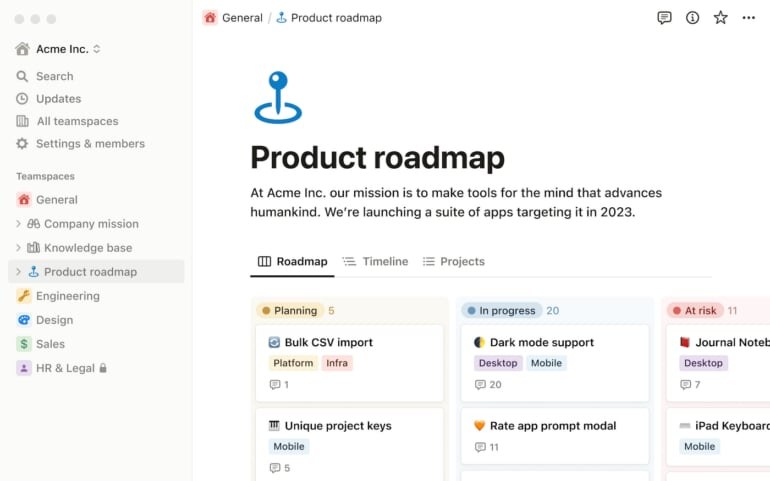
Top Notion integrations
- GitHub: Collaborate on code repositories and track development tasks alongside project management within Notion
- Slack: Receive Notion notifications and updates directly in Slack channels
- Google Drive: Attach and access Google Drive files directly within Notion
Pros and Cons
- It can serve as an all-in-one productivity tool
Notion enables freelancers to consolidate document storage, management, and sharing within a single platform. This centralization eliminates the need for multiple tools and creates a unified repository for all project-related materials.
Wrike: Best for time tracking
Wrike provides a user-friendly collaborative work management and project management solution suitable for small to midsize businesses and enterprises. Its time tracking feature automatically records hours and minutes spent on individual tasks, making it particularly valuable for freelancers compensated on an hourly basis. The platform supports unlimited tasks, subtasks, and nested structures, enabling comprehensive project and task management across organizational portfolios.
Pricing
- Free: $0 for unlimited users
- Team: $10.00 per user per month (annual billing)
- Business: $25 per user per month (annual billing)
- Enterprise: Custom quote
- Pinnacle: Custom quote
Standout features
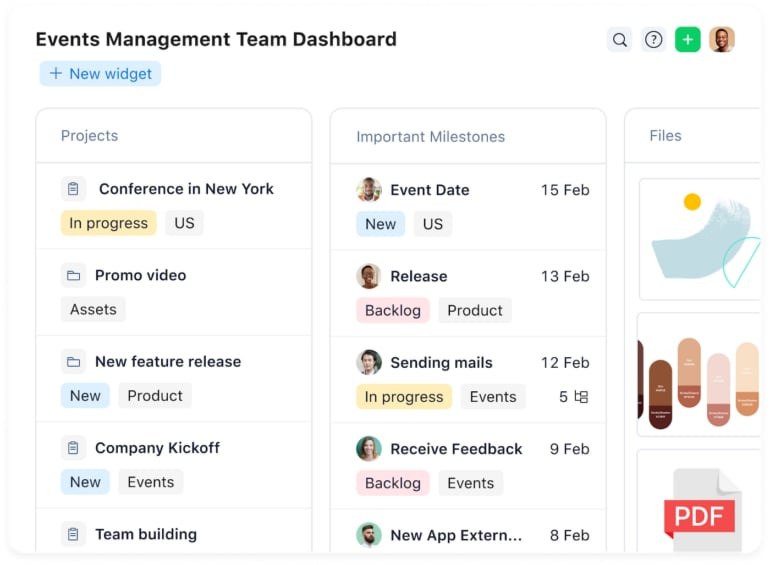
- Resource management capabilities
- Hundreds of third-party integrations with Google, Microsoft, GitHub and Jira
- Advanced resource and capacity planning tools
- Project portfolio management
- Custom work views including tables and kanban
- AI project risk prediction
Top Wrike integrations
- Okta: Secure Wrike account access using Okta credentials
- BitBucket: Seamless collaboration between developers and project managers for enhanced software development workflows
- Additional integrations: FreshDesk, Asana, GitHub and over 400 more
Pros and Cons
- Budgeting and billable hour features are available
- The free plan lacks Gantt chart features
Wrike includes comprehensive time tracking functionality for monitoring effort spent on individual tasks and projects. This capability enables freelancers to measure productivity and generate accurate client invoices based on actual hours worked.
Jira: Best for Agile teams and developers
Atlassian's Jira functions as a bug-tracking and project management platform designed specifically for Agile and Scrum teams managing project tasks and recording software defects. Its issue-tracking system provides a centralized location for task and bug management, enabling straightforward issue creation, assignment, priority setting, and deadline establishment. Jira exists as three distinct solutions: Jira Core for non-technical users, Jira for software developers, and Jira Service Desk for customer support and IT professionals. The platform distinguishes itself through scalability and extensive integration options, facilitating team expansion and connection to existing services.
Pricing
- Free: $0 for up to 10 users
- Standard: $8.15 per user per month (monthly billing) or $850 per year for User Tier 1 to 10, with pricing adjustments based on user count
- Premium: $16 per user per month (monthly billing) or $1,600 per year for User Tier 1 to 10, with pricing adjustments based on user count
- Enterprise: Custom pricing for organizations with over 800 users
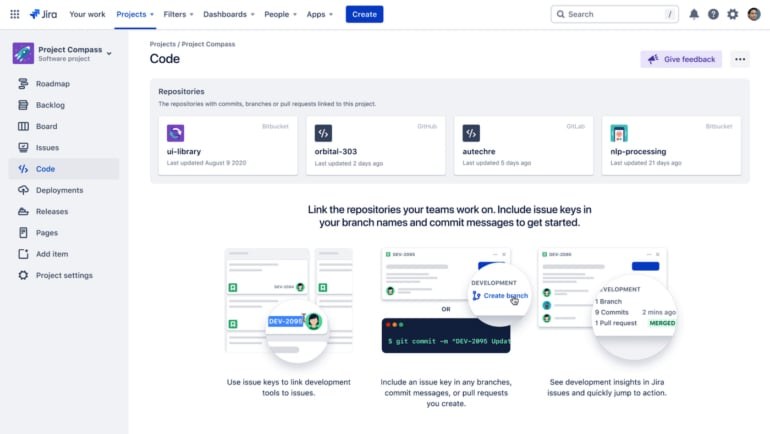
Standout features
- Scrum and kanban boards for Agile teams
- Integration with over three thousand tools including Slack, Microsoft Teams and Confluence
- Custom workflow enablement
- Drag-and-drop automation capabilities
- User roles and permission management
- Project roadmaps for team alignment
Top Jira integrations
- Salesforce: Sync data between platforms for smooth information flow between sales and project management teams
- GitHub: Connect repositories to track GitHub issues and pull requests directly within Jira
- Slack: Receive real-time notifications and updates in designated Slack channels
Jira's design prioritizes agile project management, making it ideal for freelancers operating in fast-paced environments. It supports scrum, kanban, and other agile methodologies, offering flexibility and adaptability to diverse workflows.
Trello: Best kanban board views
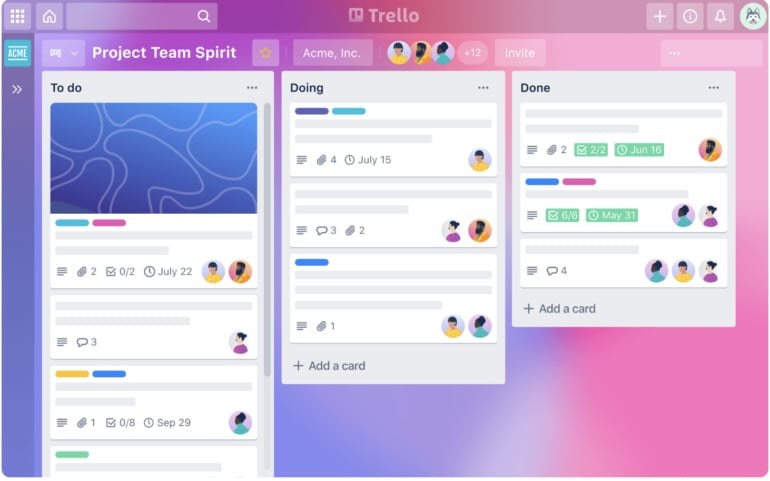
Trello delivers a kanban-based project management solution designed for small teams and individuals. Those managing straightforward projects can use it to track tasks from initial conception through invoicing, establishing it as a popular choice for freelancers. Trello's primary strength lies in its kanban board design and Power-Ups feature set. The board interface benefits visual learners managing projects, while Power-Ups extend the tool's functionality.
Pricing
- Free: $0 for up to 10 boards per Workspace
- Standard: $5 per user per month (annual billing) or $6 per user per month (monthly billing)
- Premium: $10 per user per month (annual billing) or $12.50 per user per month (monthly billing)
- Enterprise: $7.38 to $17.50 per user per month (annual billing), with pricing varying based on total user count
Standout features
- Integration with over 200 apps (Power-Ups) including Slack, Google Drive and Salesforce
- Multi-view support including timeline, map, dashboard, table and calendar
- Task and workflow automation
- Pre-built templates for marketing, design, personal, remote work and other user categories
Top Trello integrations
- Slack: Communication and collaboration app ensuring task visibility
- Gmail: Create new Trello cards without leaving your Gmail inbox
- Microsoft Teams: Link Trello boards, notifications and more to Microsoft Teams
- Google Drive: Access Drive files directly from project cards or create and attach new Drive files to cards
Pros and Cons
- Trello's standard cloud product is free for users working on open-source projects
- Standard and free plans have limited support
- Relies heavily on Power-Ups (integrations)
Trello employs a board and card system allowing freelancers to visually organize tasks, deadlines, and progress. This visual approach simplifies project status assessment at a glance.
Basecamp: Best for team communication
Basecamp appeals to individuals, small teams, and freelancers seeking collaborative project management capabilities. Teachers, students, nonprofits, and charitable organizations can also benefit from its cost savings. Basecamp enables project creation, task delegation, project tracking, progress monitoring, chat initiation, file attachment, and document storage and sharing. Originally developed by 37signals, a web design firm, as an internal tool, Basecamp now exists in its third iteration. The platform permits freelancers and individuals to invite clients as guests without additional charges, facilitating project detail and progress sharing with stakeholders. The standard plan provides 500GB of file and document storage, while the Pro Unlimited plan offers five TB.
Pricing
- Basecamp (Best for freelancers, small teams and startups): $15 per user per month (monthly billing) with free guest access
- Basecamp Pro Unlimited (Best for growing businesses and large groups): $299 per month (annual billing) or $349 per month (monthly billing), with unlimited users and no per-user pricing
Basecamp also offers free accounts for teachers and students, while nonprofits and charity organizations receive 10% discounts.
Standout features
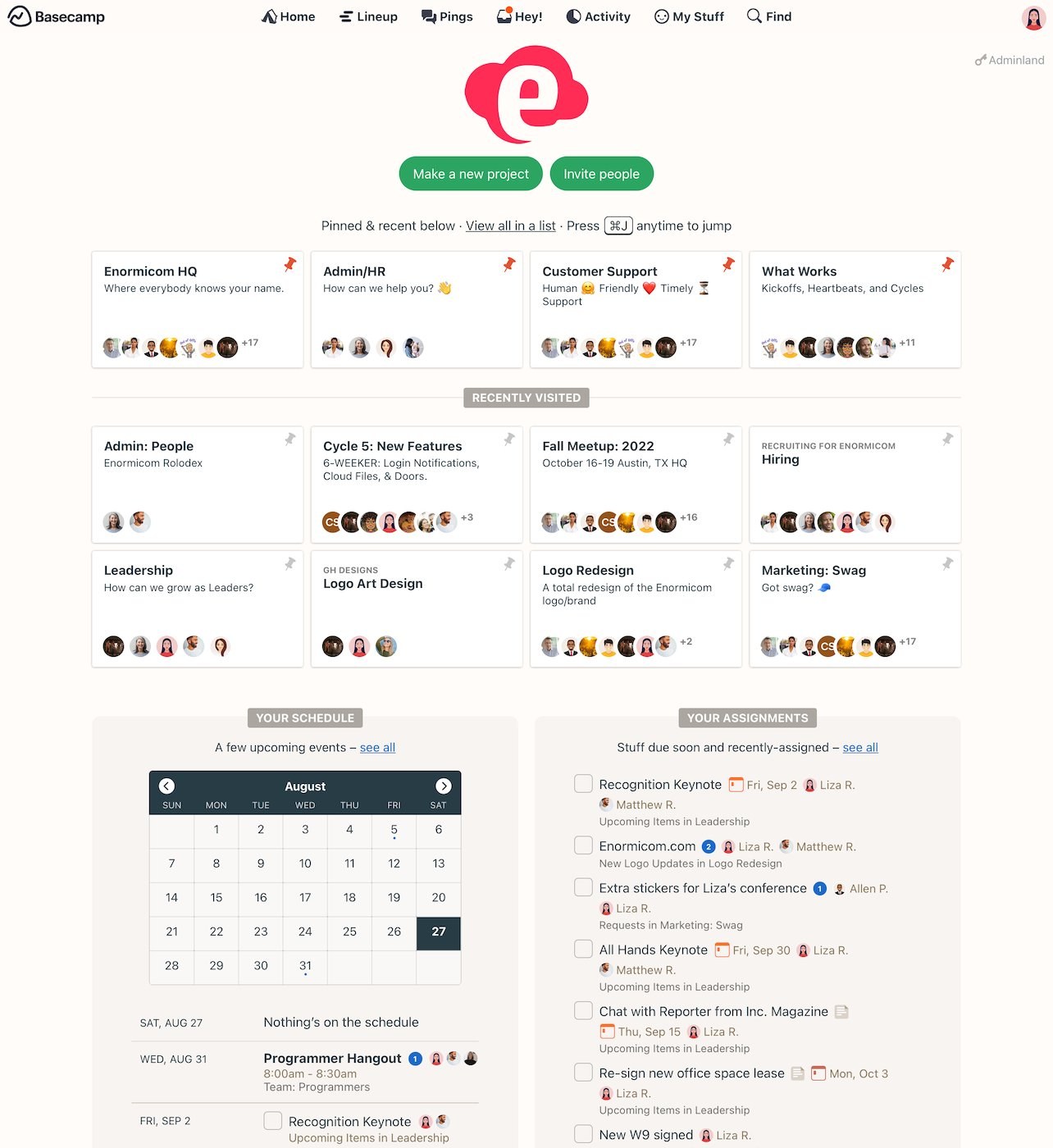
- Third-party service integrations including Calamari, CData Arc, Ganttify and more
- Real-time group chat (Campfire) and direct messaging (Pings)
- Hill Charts providing visual project progress presentation
- Consolidated notification menu
- Doc and file creation, sharing and discussion threads
- Project schedules with dated to-dos, deadlines and milestones
Basecamp integrations
- Zoho Flow: Connect Basecamp 3 with 650+ apps including Jira Cloud, Slack, Zendesk and more
- Time tracking: Integration with Harvest, Everhour, Clockify and other time tracking tools
- Software development: Honeybadger, Instabug, Ybug, and Git Helpers
Pros and Cons
- To-do lists make it easier to create tasks and assign them
- Free accounts are available for teachers and students
- No free plan is available for business use
Basecamp enables freelancers to invite clients directly to projects, facilitating effective communication and collaboration throughout project lifecycles. Clients can provide feedback, review progress, and maintain engagement in the project.
Key features of freelance project management software
When evaluating project management tools for freelance use, several critical capabilities warrant consideration. If your chosen software lacks any of these features, verify whether it integrates with third-party services offering the feature as an add-on.
Time tracking
Monitoring project and task handling requires understanding how long team members require to complete assignments. This insight enables realistic project completion date estimation. Project management software with time tracking functionality helps organizations working with freelancers—particularly those charging hourly rates—monitor progress and measure freelancer effort. This creates transparent workflows benefiting both freelancers and companies.
Kanban boards
Kanban board-equipped project management tools can enhance team productivity. Kanban methodology improves organizational processes over time and mitigates multitasking's negative consequences. Kanban typically operates through three processes: To-do, in progress, and completed. This structure ensures team members focus on the most critical tasks. For production teams, it guarantees only the most valuable features or components receive development, reducing overproduction. Kanban boards enable work visualization, work-in-progress bottleneck limitation, and continuous improvement.
Affordability
Budget-conscious individuals and freelancers require affordable project management options. If cost concerns you or your team, seek tools offering free plans or competitive pricing. All platforms in this guide except Basecamp provide free plans, and in most cases, these free versions suffice for individuals or freelancers. Note that most free plans offer only basic features. Should these products' free plans lack necessary functionality, research the best free project management software alternatives.
Gantt charts
Projects involving numerous dependencies require tools capable of monitoring progress over time and tracking milestones. Gantt charts fulfill this need through bar chart graphics representing project activities, tasks, and events. They assist teams in planning around deadlines and allocating resources appropriately.
How project management software helps freelancers
Organization and time management
Freelancers frequently manage multiple concurrent projects, creating organizational and time management challenges. Project management software addresses this by organizing tasks, deadlines, and milestones, enabling freelancers to maintain focus and meet client expectations.
Collaboration and communication
Many project management platforms offer collaboration features enabling freelancers to work seamlessly with clients and colleagues. File sharing, real-time updates, and comment threads foster effective communication and optimize workflows, boosting productivity.
Client management
Freelancers typically manage numerous clients, each with distinct projects, requirements, and deadlines. Project management software allows creation of separate project boards or spaces per client, preventing oversight and ensuring appropriate client attention.
Task and time tracking
Built-in task tracking features help freelancers monitor progress across various assignments. This capability enables bottleneck identification and prompt resolution, ensuring timely project delivery. Time tracking features additionally support accurate billing and help freelancers and clients maintain billable hour records.
Choosing the best freelance project management software
Optimal project management solutions depend on factors specific to your organization, team, and projects. No universal solution exists for all users, which is why this guide compares eight tools serving different user types. To identify the best option for your needs, use this guide as a starting point and research tools that interest you most.
Continue research by reviewing full product reviews written for each solution to explore individual features and capabilities. Alternatively, sign up for free trials to test platforms firsthand. Once you identify the right tool and confirm it meets your requirements, subscribe and onboard your team.
Review methodology
This evaluation examined dozens of project management tools and selected eight based on five key criteria: affordability, customer satisfaction, time tracking, ease of use, and scalability. We registered for each tool's free plan or trial to gain direct experience with features and usability. We also gathered user experience data from review sites to assess customer satisfaction ratings.
Read more

California Tightens Rules on Robotaxis as Incidents Mount
A new state law sets safety standards and accountability measures for autonomous vehicle operators, requiring local support staff and penalties for blocking emergency responders.

Wawa Elevates Long-Tenured Executive to CIO Role
The convenience store chain has named Bill O'Donnell, a 25-year company veteran, as its new chief information technology officer, putting him in charge of tech strategy, cybersecurity and digital operations.

ServiceNow Debuts Flow, a Conversational Service Desk Built for Speed Over Complexity
ServiceNow is rolling out Flow, a natural language service desk tool that automates employee requests through Slack and Microsoft Teams without requiring a full IT service management overhaul.