Applitools Lets AI Coding Agents Check Their Work Against Figma Designs
A new integration allows AI-powered development tools to automatically compare generated interfaces against Figma frames, catching visual drift before it reaches users. The update transforms design files into automated quality gates for AI-assisted development.
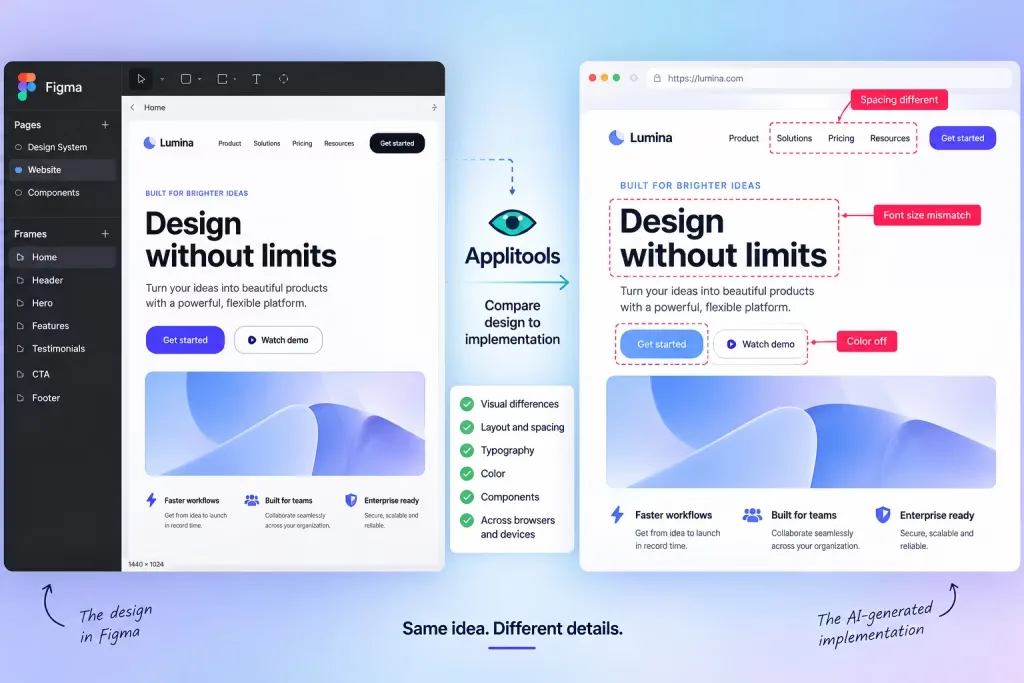
Artificial intelligence coding assistants have grown adept at translating natural language prompts into functional user interfaces. Yet a critical gap remains: whether the rendered output actually matches the designer's original vision.
Applitools has released a solution targeting this exact challenge. The company's new Figma Design Baselines integration enables development teams to designate Figma frames as visual reference points and automatically measure the rendered interface against those standards.
Rather than waiting for a designer to spot layout shifts or component misalignments weeks into development, visual discrepancies can now surface immediately through automation.
Speed creates new quality problems
Platforms including Claude Code, Cursor, GitHub Copilot and Codex generate and revise front-end code at remarkable velocity. Yet rapid code generation does not guarantee the visual output will match approved designs.
Functional code and visually correct code represent separate concerns. A button may execute its intended action while positioned in an unintended location. Text may reflow unexpectedly. Cards may exceed their intended width. Responsive behavior may fail at specific screen sizes. None of these issues necessarily indicate broken code—they signal implementation divergence from the design.
Applitools' Figma integration addresses this by accepting a Figma frame URL as the visual baseline. The system automatically aligns the test viewport with the design dimensions and identifies visual discrepancies between the intended design and the built result.
The approach requires no Figma plugin installation, no manual screenshot exports and no separate baseline image uploads—eliminating the tedious workflow of comparing Figma windows against browser windows side by side.
Figma shifts from artifact to arbiter
The integration redefines Figma's function within AI-assisted development pipelines. Historically, designers created Figma files that developers then interpreted and built, with multiple rounds of back-and-forth refinement until alignment was reached.
AI-generated interfaces accelerate this cycle substantially, but the risk of visual drift persists. The new workflow repositions the Figma design as a machine-readable visual specification that automated testing validates against live implementations.
Applitools describes the mechanism as connecting live tests directly to Figma design URLs, automatically matching viewport dimensions to the original frame and applying its Visual AI comparison engine to the rendered output.
AI agents gain diagnostic capability
The September 15 release also expanded Applitools' Eyes MCP Server, which integrates visual testing with AI coding agents. Previously, agents connected to Eyes MCP could only create visual tests through chat. The new capability allows agents to examine, evaluate and resolve tests directly.
Applitools reports that the system delivers pixel-level visual difference data alongside DOM context to the agent, enabling identification of what changed without requiring developers to navigate a separate testing interface.
Agents can approve, decline or mask visual baselines without leaving the chat environment. The announcement specifically names Claude Code, Cursor, Copilot, Codex and Cline as supported AI coding workflows.
The combination creates a closed feedback mechanism: Figma design → built implementation → visual comparison → identified difference → AI-assisted resolution.
This differs meaningfully from simply asking an AI whether a screenshot appears correct. Applitools positions its Visual AI as a deterministic validation layer that performs the comparison and supplies the coding agent with resulting visual differences and structural information.
Solving AI coding's unglamorous reality
AI-generated websites perform impressively in demonstrations because demonstrations typically conclude the moment the interface appears. Production environments demand more. Interfaces undergo modification, components get repurposed, browsers render inconsistently, responsive designs break at certain viewports and stakeholders eventually question why buttons appear misaligned on mobile devices.
This release addresses concerns beyond basic code generation success. Applitools' platform performs visual validation across browsers, devices and operating systems, while the Figma integration supplies the original design specification.
The distinction matters: "code generated successfully" and "output matches the design" represent fundamentally different outcomes.
Design specifications gain prominence
Considerable discussion surrounds how AI coding tools will reshape conventional design practices. This development suggests one trajectory: Figma files increasingly function as visual specifications that anchor AI-generated interfaces to their original intent.
The workflow operates as follows: the coding agent constructs the interface, the browser renders it, Applitools performs the comparison and the Figma design serves as the reference standard.
Should such workflows become standard, designers might dedicate less effort to flagging spacing errors and substantially more time determining what the interface should fundamentally accomplish—a considerably more valuable application of design expertise.
Read more

Identity governance faces new test as AI agents proliferate across enterprises
Autonomous AI agents are forcing organizations to rethink how they manage access and permissions at machine speed. SailPoint's Navigate conference will explore how identity security must evolve to handle this expanding population of non-human actors.

Vertical AI and Purpose-Built Hardware Drive Next Wave of Technology Growth
Specialized AI systems tailored to specific industries are emerging as the primary engine for the next phase of technology expansion, according to insights from the Bank of America Private Tech Trailblazers Conference 2026.

CrowdStrike and CoreWeave Partner to Automate AI Security at Machine Speed
As cyberattackers breach systems in seconds, CrowdStrike and CoreWeave are embedding automated defenses throughout AI infrastructure, turning attacks into training data for faster response.